Articulate Rise: Everything You Need to Know About This Powerful E-Learning Authoring Tool

Introduction
Articulate Rise, Creating engaging online training courses has become easier than ever, thanks to modern e-learning authoring software. Among the most popular solutions available today, Articulate Rise stands out for its simplicity, flexibility, and professional results. Whether you’re an instructional designer, corporate trainer, educator, or business owner, Articulate Rise helps you build responsive online courses without requiring advanced technical skills.
Unlike traditional course development software that often involves a steep learning curve, Articulate Rise focuses on speed and ease of use. Its web-based platform allows users to create visually appealing lessons, interactive quizzes, multimedia-rich content, and mobile-friendly courses in just a few clicks. This makes it an excellent choice for organizations that need to develop high-quality training programs quickly.
In this comprehensive guide, we’ll explore everything you need to know about Articulate Rise, including its features, benefits, pricing, use cases, strengths, limitations, and best practices for creating exceptional online learning experiences.
What Is Articulate Rise?
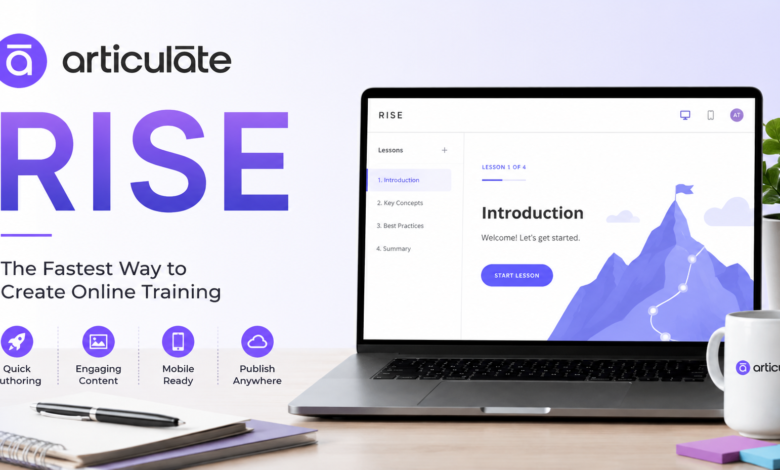
Articulate Rise is a cloud-based e-learning authoring application that is part of the Articulate 360 suite. It enables users to design responsive online courses that automatically adapt to desktops, tablets, and smartphones without additional customization.
One of the biggest reasons behind the popularity of Articulate Rise is its intuitive interface. Even beginners can create polished courses by selecting pre-built lesson layouts, adding interactive blocks, embedding videos, inserting quizzes, and organizing content into attractive modules. There is no need to write code or have graphic design experience.
The platform is widely used in corporate learning, compliance training, employee onboarding, higher education, healthcare, sales enablement, and customer education. Because everything is browser-based, users can access their projects from virtually anywhere with an internet connection.
Key Features of Articulate Rise
One of the strongest aspects of Articulate Rise is its impressive collection of built-in features that simplify course creation while maintaining a professional appearance.
The responsive design automatically adjusts every lesson for different screen sizes. Learners enjoy a consistent experience whether they access courses on laptops, tablets, or smartphones. Course creators don’t need to create separate versions for different devices.
Another major feature is the wide variety of content blocks available. Users can include text, images, videos, audio, timelines, flashcards, tabs, accordions, labeled graphics, process diagrams, interactive knowledge checks, and downloadable resources. These blocks make learning far more engaging than plain text presentations.
Articulate Rise also supports quizzes, assessments, branching scenarios, completion tracking, SCORM export, xAPI support, LMS compatibility, and collaboration among team members. These capabilities make it suitable for organizations of all sizes.
Why Professionals Choose Articulate Rise
Many instructional designers appreciate Articulate Rise because it dramatically reduces course development time. Instead of spending weeks designing layouts, users can focus on creating meaningful learning content.
The clean and modern interface ensures that every course looks polished without requiring extensive customization. This consistency helps organizations maintain professional branding across all training materials.
Another reason professionals choose Articulate Rise is its collaboration features. Multiple stakeholders can review projects, leave comments, and suggest revisions during development. This streamlined workflow reduces communication delays and speeds up project completion.
Major Benefits of Using Articulate Rise
One significant benefit of Articulate Rise is its beginner-friendly approach. New users can quickly become productive thanks to its intuitive drag-and-drop editing environment and organized interface.
The platform also offers exceptional mobile responsiveness. Since online learners increasingly access training from smartphones, responsive design has become essential rather than optional. Articulate Rise automatically handles this without additional effort from course creators.
Cloud storage is another major advantage. Projects are saved online, making them accessible from different devices and reducing the risk of losing work due to hardware failures. Automatic updates also ensure users always have access to the newest features.
How Articulate Rise Improves Online Learning
Learning effectiveness depends not only on information but also on presentation. Articulate Rise improves learner engagement by combining attractive layouts with interactive learning experiences.
Instead of reading long pages of text, learners interact with flashcards, timelines, clickable graphics, knowledge checks, and multimedia content. These elements encourage active participation and improve information retention.
Microlearning is another strength of Articulate Rise. Course creators can divide complex topics into smaller, manageable lessons that learners can complete at their own pace. This approach aligns well with modern learning preferences and busy work schedules.
Common Use Cases for Articulate Rise
Businesses frequently use Articulate Rise for employee onboarding. New hires can complete structured training modules covering company policies, workplace safety, culture, and job responsibilities from any device.
Educational institutions also rely on Articulate Rise to create online lessons, blended learning materials, student assessments, and supplemental classroom resources. Teachers appreciate its simplicity and ability to keep students engaged.
Healthcare organizations, financial institutions, government agencies, manufacturing companies, and technology firms use Articulate Rise for compliance training, certification programs, product education, cybersecurity awareness, leadership development, and customer training.
Articulate Rise vs Traditional Course Development
Traditional e-learning software often requires significant design work before content creation even begins. Developers may spend hours adjusting layouts, formatting pages, and optimizing mobile experiences.
Articulate Rise simplifies this process by providing professionally designed templates and responsive layouts from the start. This allows developers to focus on educational quality instead of technical formatting.
While some desktop authoring tools provide greater customization, Articulate Rise excels in speed, consistency, ease of maintenance, and collaborative development. For many organizations, these advantages outweigh the need for extensive visual customization.
Best Practices for Creating Courses in Articulate Rise
Successful Articulate Rise courses begin with clear learning objectives. Before building content, identify exactly what learners should know or be able to do after completing the course.
Keep lessons concise and organized into logical sections. Short modules improve learner attention and make information easier to absorb. Using headings, multimedia, and interactive blocks also enhances readability.
Include regular knowledge checks throughout the course instead of relying only on a final assessment. Frequent quizzes reinforce learning and provide immediate feedback that helps learners identify areas requiring additional attention.
Tips to Maximize the Power of Articulate Rise
Use high-quality visuals that support learning rather than simply decorating the course. Images, diagrams, and icons should explain concepts clearly and maintain a consistent visual style.
Take advantage of interactive blocks whenever appropriate. Flashcards, labeled graphics, accordions, and tabs encourage learners to explore information actively instead of passively reading large amounts of text.
Review courses carefully before publishing. Test navigation, multimedia playback, quiz functionality, accessibility, spelling, grammar, and mobile responsiveness. A polished learning experience increases learner confidence and course effectiveness.
Advantages and Limitations of Articulate Rise
Like every software platform, Articulate Rise has both strengths and limitations.
Advantages
- Extremely easy to learn
- Responsive design by default
- Cloud-based access
- Fast course development
- Professional appearance
- Excellent collaboration tools
- LMS compatibility
- Interactive content blocks
- Regular updates
- No coding required
Limitations
- Less visual customization than some desktop authoring tools
- Internet connection required during development
- Advanced animations are limited
- Complex game-based learning experiences may require additional tools
- Subscription-based licensing may not suit every budget
Despite these limitations, the advantages make Articulate .Rise one of the leading e-learning authoring solutions available today.
Who Should Use Articulate Rise?
Articulate Rise is suitable for organizations and individuals who need to develop online training quickly while maintaining professional quality.
Instructional designers benefit from faster production workflows and consistent course layouts. Corporate trainers appreciate the ability to update content easily whenever business requirements change.
Small businesses can create onboarding and customer education materials without hiring large development teams. Universities, nonprofits, consultants, government agencies, healthcare providers, and freelancers also find Articulate .Rise valuable because of its simplicity and scalability.
The Future of Articulate Rise
As online learning continues to grow worldwide, platforms like Articulate .Rise are becoming increasingly important. Organizations are investing more heavily in digital learning solutions that support remote work, continuous professional development, and flexible education.
Future improvements are expected to focus on enhanced collaboration, AI-assisted content creation, accessibility features, analytics, learner personalization, and deeper integration with learning management systems. These innovations will further strengthen Articulate .Rise as a leading solution in the e-learning industry.
Because the platform is cloud-based, users automatically receive updates without installing new software. This ensures they always benefit from the latest features and security improvements.
Conclusion
Articulate .Rise has transformed the way organizations create online learning experiences. Its intuitive interface, responsive design, interactive content blocks, cloud-based collaboration, and professional templates make it one of the most effective e-learning authoring tools available today.
Whether you’re building employee onboarding programs, compliance courses, academic lessons, customer education materials, or professional development training, Articulate .Rise provides an efficient solution that balances simplicity with powerful functionality. By following best practices and leveraging its interactive features, course creators can produce engaging learning experiences that improve knowledge retention and learner satisfaction.
For anyone looking to develop modern online courses without the complexity of traditional authoring software, Articulate .Rise remains an outstanding choice that continues to evolve alongside the growing demands of digital education.
You May Also Read: James Hamilton McDonough