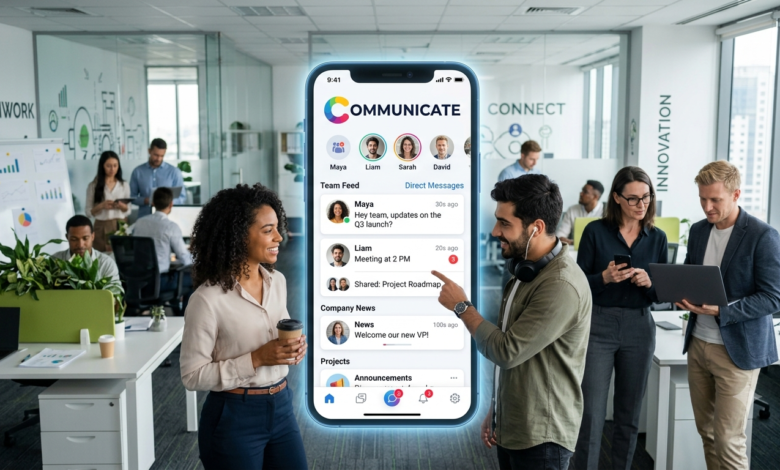
Employee Communication App, In the modern workplace, communication can determine success or failure in a particular project. Workers may be located in different offices, cities, or even countries, yet they have to remain in constant contact and be well-informed. In this regard, the use of employee communication app becomes essential. Rather than exchanging a large amount of emails, sending different notifications, or holding too many meetings, the company can provide one single platform for all employees.
An Employee communication app is not only a messaging system. This solution can integrate different aspects of internal communication such as announcements, conversations between employees, files, notifications, feedbacks, and updates on the workplace. All this improves the process of communication for employees and enables managers to spread their information in a proper manner.
As companies become more and more open to remote and hybrid work, effective internal communication becomes a priority. Employee communication app helps workers to feel involved, minimizes misunderstandings, fosters collaboration, and builds workplace culture. However, there are plenty of different solutions on the market, and it is necessary to know their features before choosing one of them.
Table of Contents
- What Is an Employee Communication App?
- Why Do Businesses Need an Employee Communication App?
- Key Features to Look For
- Benefits of Using an Employee Communication App
- Employee Communication Apps for Remote and Hybrid Teams
- How These Apps Improve Workplace Productivity
- How to Choose the Right Employee Communication App
- Common Mistakes Businesses Should Avoid
- Employee Communication App vs. Traditional Email
- Tips for Getting Employees to Use the App
- Frequently Asked Questions
- Final Thoughts
What Is an Employee Communication App?
An employee communication application is a computer application that helps employees, managers, and an organization communicate among themselves. The types of communication the software offers are instant messaging, company announcements, group conversations, document management, employee feedback, video call options, among others.
Unlike the conventional ways, these platforms are designed keeping in mind the needs of today’s workplace. The employees can use the application via smartphone, tablet, laptop or desktop computer. The advantage of such an application is that employees get access to all the information related to their workplace without having to be seated at their desks.
The core concept behind the software is straightforward; to provide all kinds of communication within a single environment. With the help of the software, employees no longer have to use multiple applications to check their messages, announcements, documents, etc.
Why Do Businesses Need an Employee Communication App?
Nowadays, companies have people who work in various places and hours. While one manager might be at the office, another employee will be working from home while the third one might be traveling for the company. In the absence of a proper communication system, critical information might get lost.
E-mail communication is still good in some cases; however, it cannot be considered as perfect internal communication channel. Critical information can get lost among tens of emails, while the employees may be reluctant to look for it among long emails threads. The use of the separate application will help organize the communication process.
The second reason for using such applications is employee engagement. Employees receive company-related news and updates, are recognized by their superiors, are given opportunities to provide feedback on various issues. In this way, employees are better informed about what is going on instead of being alienated from management and other departments.
Key Features to Look For
The best application for employee communication would depend on the needs of a specific company; however, some features are particularly helpful. Communication is typically one of the most crucial functions. Employees need to communicate either privately or in groups without setting up unnecessary email threads.
Announcements to all staff members are also very helpful. This tool allows management to disseminate news, policies, future events, reminders or other updates. Ideally, employees would receive relevant notifications without being bombarded with too many of them.
The following features could also be considered: file sharing, search, employee directory, polls, as well as integration with other applications. Some apps have video meetings, tasks management, calendar and even recognition tools included. In choosing the application, companies should pay attention to the functions that employees will use rather than pick up an application just because it offers the largest number of functions.
Benefits of Using an Employee Communication App
A great thing about it is that you have more efficient communication. You can send information to your employees via the app instead of waiting for them to log into their emails. Your employees will get the information right away, ask questions and communicate with other colleagues without unnecessary delay.
Another advantage is improved organization. You can divide the conversations into teams, projects, departments or any specific topic. It will make it easier for employees to find the information they need. An organized system of communication might be especially useful if your teams work on multiple projects at once.
These apps can help improve engagement as well. It is not only important that communication is used to send your messages from management to employees. Employees also need to ask questions, share their thoughts, recognize others and give feedback. Good app will make the internal communication a two-way process.
Employee Communication Apps for Remote and Hybrid Teams
Remote and hybrid work have changed how employees interact. People who work from home may not have the same informal conversations they would normally have in an office. A communication app can help replace some of those everyday interactions with digital communication.
For remote teams, accessibility is especially important. Employees should be able to communicate from wherever they are working without needing to be physically present in an office. Mobile access can be particularly useful for employees who travel or do not spend their entire day at a desk.
Hybrid teams can also benefit because communication becomes more consistent. Employees working in the office and employees working remotely can access the same announcements, conversations, and resources. This can help prevent remote workers from feeling left out of important workplace discussions.
How These Apps Improve Workplace Productivity
A lack of effective communication can lead to unnecessary labor. Employees may need to search for information, repeat questions, and try to understand poorly worded instructions. Effective centralization of communications can alleviate such issues to some extent.
The employee communication app will help to collaborate more efficiently. Team members can exchange information, talk about any problems, and give feedback without needing to organize a meeting for each issue. It does not mean that such meetings will no longer be required but will allow for preserving them only for important discussions.
Improved communication can prevent misunderstandings. Providing clear information and allowing people to ask questions will enable teams to make decisions with confidence.
How to Choose the Right Employee Communication App
Selecting a communication platform for workers should start with determining their real needs. Thus, a small enterprise can opt for a basic service providing messaging and notifications, while a larger company may require some additional features such as administration, integration, user directory, etc.
An important factor to consider when choosing an application is how easy it is to use. If an otherwise good platform is too complicated for workers, they would not be able to work with it. Therefore, it is important to choose one that is intuitive and functional enough on commonly used by workers devices.
Security and privacy should also be considered. Many companies discuss projects and policies using communication tools. Therefore, it is important to take into account the features regarding security, account management, data protection, and others.
Common Mistakes Businesses Should Avoid
One of the most common errors is that people select the platform based only on the quantity of its features. However, the number of features does not guarantee good communication experience. If employees need only messaging, announcements and file sharing, an extra complex platform will cause confusion.
The second error is using the application without setting communication rules. Employees need to know what kind of communication can be made in public channels and when direct messages should be used. Setting communication rules will help to avoid chaos on the platform.
Thirdly, it is important for businesses to stop sending excessive notifications. If employees get numerous notifications for irrelevant updates, they will get tired of them and simply stop reading. It is crucial to focus on the essential information.
Employee Communication App vs. Traditional Email
Nevertheless, the email is still important when it comes to formal communication, external communication, documentation, and where a formal approach is needed. On the other hand, it may not be the fastest way to communicate internally in day-to-day activities.
The employee communication app would be more appropriate in fast communication, team updating, group communication, and collaboration. The employees can communicate without filling up their email inboxes with short messages that do not need to be formalized as emails.
However, there is no need for those two ways of communication to clash with one another. In fact, many businesses may gain advantage by using both of them. The email can deal with formal communication, whereas the employee communication app can help with collaboration and internal communication.
Tips for Getting Employees to Use the App
Introducing a new communication platform does not guarantee that everyone will immediately use it. Employees may already have established habits, and changing those habits can take time. Businesses should explain why the new platform is being introduced and how it will make employees’ work easier.
Training can also help. Even if an app looks simple, employees should know how to send messages, join channels, adjust notifications, search for information, and use important features. Short demonstrations or quick-start guides can make adoption much easier.
Finally, managers should lead by example. If leadership continues to rely entirely on old communication methods, employees may have little reason to change. When managers consistently use the new platform for appropriate workplace communication, employees are more likely to follow.
Frequently Asked Questions
What is the main purpose of an employee communication app?
The main purpose is to make internal workplace communication faster, easier, and more organized. It gives employees and managers a central place to share messages, announcements, updates, files, and feedback.
Can an employee communication app support remote workers?
Yes. Many communication apps are designed to support employees working from different locations. Mobile and desktop access can allow remote and hybrid teams to communicate without needing to be in the same physical workplace.
Is an employee communication app better than email?
Not necessarily. Both have different purposes. Email is useful for formal communication, while an employee communication app can be more convenient for real-time conversations, team discussions, announcements, and collaboration.
What features should a business prioritize?
Businesses should generally consider messaging, announcements, search, file sharing, notifications, mobile access, integrations, administration, and security. The most important features depend on the organization’s size and communication needs.
How can companies encourage employees to use the app?
Companies can encourage adoption by providing simple training, explaining the benefits, setting clear communication guidelines, and having managers actively use the platform. Employees are more likely to adopt a tool when it genuinely makes their work easier.
Final Thoughts
In the context of workplace communication, an Employee communication app may become an excellent addition. Such an app helps to exchange information, communicate efficiently, cooperate, and keep contacts even in case of different locations within the workplace.
The most valuable advantage of using such an application is not the possibility to have one more app on a phone or a computer. It is necessary to mention the creation of a new level of organization of communication when employees will understand where they can find certain information or contact particular colleagues.
Nevertheless, choosing the platform should not be based only on the analysis of the features offered by an app. The usability of the app, its level of security, the needs of the employees, integration capabilities, accessibility, and the types of communication should be taken into consideration. With the proper choice, such an application will eliminate any communication obstacles and will help to create the optimal conditions for information exchange in the workplace.
Considering the fact that workplaces become more and more flexible and distributed, efficient communication will become crucial.
You May Also Read: Digital Workplace Platform