CodePen: The Ultimate Playground for Front-End Developers to Learn, Build, and Share Code

What Is CodePen and Why Is It So Popular?
CodePen has become one of the most recognizable online platforms for front-end developers, web designers, and coding enthusiasts. Whether you’re creating a simple button animation or building an interactive user interface, Code.Pen provides a fast and convenient environment where you can write HTML, CSS, and JavaScript directly in your browser. Unlike traditional development setups that require installing multiple tools, Code.Pen allows users to start coding immediately without worrying about software configuration.
One of the biggest reasons behind the success of CodePen is its simplicity. Beginners appreciate the platform because it removes many technical barriers, while experienced developers enjoy its speed and flexibility. Since everything runs online, users can focus entirely on writing code and experimenting with ideas instead of spending time configuring local development environments.
Another factor that makes Code.Pen stand out is its thriving community. Thousands of developers publish creative projects every day, ranging from impressive CSS art to complete website components and JavaScript experiments. Browsing these public projects is both educational and inspiring, making Code.Pen an excellent resource for learning modern web development techniques.
How CodePen Works
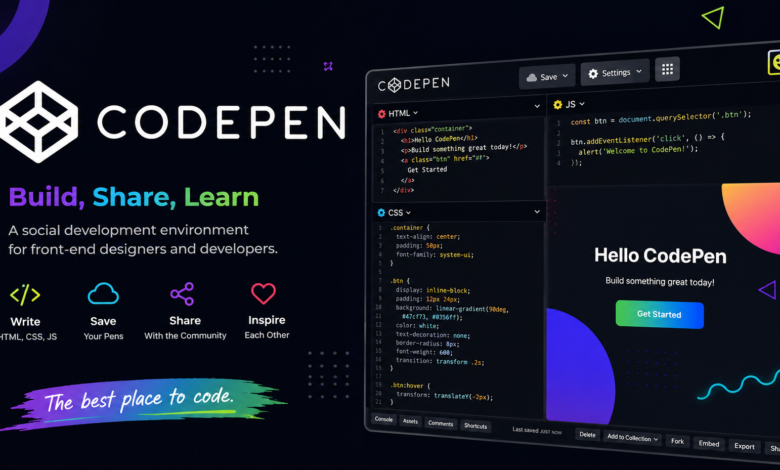
At its core, CodePen is an online code editor designed specifically for front-end technologies. Every project, commonly called a “Pen,” contains three separate panels for HTML, CSS, and JavaScript. As users type code into these panels, the preview updates automatically in real time, creating an instant feedback loop that makes learning and debugging much easier.
The live preview feature is one of the platform’s strongest advantages. Instead of refreshing the browser manually after every small change, developers immediately see the results of their edits. This makes experimenting with layouts, colors, animations, and interactions significantly faster than traditional workflows.
CodePen also supports popular front-end libraries and frameworks. Developers can easily include Bootstrap, Tailwind CSS, React, Vue, jQuery, GSAP, and many other tools with just a few clicks. This flexibility enables users to build anything from simple demos to complex interactive web applications without additional setup.
Key Features That Make CodePen Special
One of the most impressive features of CodePen is its intuitive editor. The clean interface helps developers concentrate on writing code while offering helpful options like auto-save, auto-update previews, syntax highlighting, and code formatting. These features improve productivity without overwhelming users with unnecessary complexity.
Another valuable feature is project sharing. Every Pen has its own unique URL, making it incredibly easy to send projects to clients, teammates, instructors, or friends. Since recipients can immediately view both the live preview and source code, collaboration becomes much smoother.
CodePen also includes collections, templates, asset hosting, and project organization tools. Users can group related Pens together, reuse templates for future work, and manage larger development projects efficiently. For professional developers, these features save considerable time during repetitive tasks.
The platform further encourages creativity through community challenges, trending projects, and featured Pens. Developers frequently participate in coding challenges that inspire them to explore advanced CSS effects, animations, SVG graphics, canvas projects, and creative user interface designs.
Why Beginners Love CodePen
Learning web development can feel intimidating, especially when beginners must install editors, browsers, package managers, and local servers before writing their first line of code. CodePen removes those obstacles by offering everything directly in the browser, making the learning process much more approachable.
Students can focus entirely on understanding HTML structure, CSS styling, and JavaScript functionality without worrying about technical setup. Since every code change instantly appears in the preview window, beginners quickly understand how their code affects the webpage. This immediate visual feedback significantly improves learning speed.
Another reason beginners enjoy CodePen is the ability to study projects created by experienced developers. Every public Pen serves as a practical learning example. Instead of reading theoretical explanations alone, learners can inspect real code, duplicate projects, modify them, and discover how professional developers solve design challenges.
Teachers and coding instructors also frequently use CodePen during online classes because students only need a web browser and internet connection. This consistency simplifies classroom demonstrations and coding exercises.
How Professional Developers Use CodePen
Although CodePen is beginner-friendly, it remains incredibly valuable for experienced developers. Many professionals use it as a rapid prototyping environment where they can test new ideas before integrating them into larger applications.
Frontend developers often build reusable interface components such as navigation menus, buttons, forms, sliders, and cards using CodePen. Once satisfied with the result, they transfer the polished code into production projects. This workflow minimizes risk and speeds up development.
Designers also rely on CodePen for creating CSS animations, hover effects, typography experiments, and responsive layouts. Because the preview updates instantly, adjusting design details becomes remarkably efficient compared to editing complete websites.
Technical writers, educators, and bloggers frequently embed CodePen projects into tutorials. Instead of showing static screenshots, readers can interact directly with live examples, making educational content much more engaging and practical.
Benefits of Using CodePen for Learning
One of the greatest strengths of CodePen is its ability to encourage experimentation. Developers can freely test ideas without worrying about breaking an existing project. Since creating a new Pen only takes seconds, users feel more comfortable exploring unfamiliar concepts.
CodePen also improves debugging skills. Because projects are generally smaller and focused on individual features, identifying coding mistakes becomes much easier than searching through thousands of lines of production code. This helps developers build confidence while strengthening their understanding of HTML, CSS, and JavaScript.
The platform’s extensive library of public Pens serves as an enormous educational resource. Whether someone wants to learn Flexbox, CSS Grid, SVG animations, Canvas API, WebGL, or JavaScript event handling, there are countless examples available for study and modification.
Additionally, developers can receive community feedback by sharing their projects publicly. Constructive comments often lead to improved coding practices, cleaner solutions, and fresh perspectives that may not have been considered initially.
CodePen Free vs Pro: Which One Should You Choose?
The free version of CodePen provides enough functionality for most beginners and hobby developers. Users can create public Pens, browse community projects, experiment with code, and access the live editor without paying anything. For learning and casual coding, the free plan delivers excellent value.
The Pro version introduces advanced features designed for professionals. These include private projects, asset hosting, advanced collaboration options, project templates, live collaboration mode, custom domains, and enhanced project management capabilities. Teams and freelancers often benefit from these productivity improvements.
Choosing between the free and Pro versions depends largely on individual needs. If someone is learning web development, building a portfolio, or practicing coding exercises, the free plan is usually sufficient. However, agencies, educators, freelancers, and businesses that require privacy and collaboration tools may find the Pro subscription worthwhile.
Regardless of the chosen plan, CodePen remains one of the most accessible front-end development platforms available today.
Tips to Get the Most Out of CodePen
Developers can maximize their CodePen experience by exploring trending Pens regularly. Observing how skilled developers solve problems exposes users to new CSS techniques, JavaScript patterns, and creative design approaches that improve coding abilities over time.
Creating small daily projects is another excellent habit. Rather than attempting massive applications immediately, building buttons, cards, loaders, navigation bars, or animation effects helps reinforce essential concepts while steadily improving practical skills.
It is also beneficial to duplicate impressive public Pens and experiment with modifications. Changing colors, layouts, animations, or functionality encourages deeper understanding than simply reading someone else’s code. Hands-on learning consistently produces stronger programming skills.
Finally, organizing projects into collections makes it easier to revisit useful examples later. As developers accumulate dozens or even hundreds of Pens, proper organization saves time and creates a valuable personal reference library.
Common Use Cases for CodePen
Many developers use CodePen for portfolio projects because it offers an easy way to showcase coding abilities. Instead of uploading screenshots, candidates can share interactive demonstrations that employers can explore instantly. This creates a much stronger impression during job applications and interviews.
Businesses often use CodePen when presenting interface concepts to clients. Interactive prototypes communicate ideas far more effectively than static mockups, allowing clients to experience animations and functionality before development begins.
Content creators also appreciate CodePen because it simplifies tutorial creation. Writers can embed working examples into articles, making technical explanations easier to understand. Readers can even modify the code themselves, transforming passive reading into active learning.
Hackathons and coding competitions frequently rely on CodePen for rapid development because participants can begin coding immediately without installing development environments. This speed allows teams to focus on solving problems rather than configuring tools.
Final Thoughts on CodePen
CodePen has earned its reputation as one of the best online environments for front-end web development. Its combination of simplicity, powerful features, instant previews, and an active community makes it valuable for beginners, educators, designers, and experienced developers alike. Whether someone is learning HTML for the first time or testing advanced JavaScript frameworks, CodePen provides an efficient and enjoyable coding experience.
Beyond being just an online editor, CodePen has evolved into a learning platform, portfolio builder, collaboration tool, and source of endless inspiration. Developers can experiment freely, discover innovative techniques, share their work, and continuously improve their skills within a supportive global community.
As web development continues to evolve, CodePen remains one of the most practical tools for turning creative ideas into working prototypes within minutes. If you’re looking for a platform that combines education, productivity, and creativity in one place, CodePen deserves a permanent spot in your web development toolkit.