Christmas App Icons: The Ultimate Guide to Giving Your Phone a Festive Holiday Look

Introduction
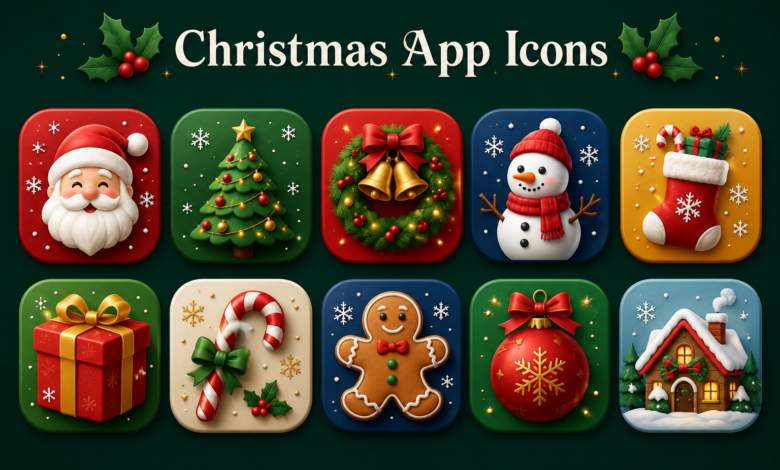
Christmas App Icons holiday season is all about creating a warm, cheerful atmosphere, and your smartphone deserves to join the celebration too. One of the easiest and most creative ways to personalize your device is by using Christmas app icons. These festive icons instantly transform your home screen with holiday-themed designs featuring snowflakes, Christmas trees, Santa Claus, candy canes, ornaments, reindeer, and cozy winter colors.
As more people customize their smartphones, seasonal icon packs have become incredibly popular. Whether you use an Android device or an iPhone, Christmas-themed icons can make your everyday apps feel fresh and exciting throughout the holiday season. From subtle minimalist designs to colorful cartoon-inspired artwork, there is a style for everyone.
This guide covers everything you need to know about Christmas app icons, including their benefits, popular styles, where to find them, installation tips, customization ideas, and how to choose the perfect icon pack for your device. By the end, you’ll have plenty of inspiration to create a beautiful holiday home screen that captures the magic of Christmas.
What Are Christmas App Icons?
Christmas app icons are custom-designed replacements for your default application icons. Instead of the standard look provided by your phone, these icons feature festive artwork inspired by Christmas traditions and winter holidays.
Most Christmas icon packs include redesigned versions of popular apps such as Messages, Camera, Photos, Calendar, Gmail, Spotify, YouTube, Instagram, TikTok, WhatsApp, Facebook, Maps, and many others. Rather than changing how the apps function, they simply change their appearance on your home screen.
The growing popularity of home screen customization has made Christmas app icons a seasonal favorite. Many users enjoy switching themes throughout the year, and Christmas provides the perfect opportunity to decorate both their homes and their digital devices with festive colors and charming holiday graphics.
Why Christmas App Icons Are So Popular
One of the biggest reasons people love Christmas app icons is that they instantly create a festive mood. Every time you unlock your phone, you’re greeted with cheerful holiday designs that make even routine tasks feel a little more enjoyable.
Another reason for their popularity is personalization. Modern smartphones offer countless customization options, and changing app icons is one of the simplest ways to make your device reflect your personality. During the holiday season, Christmas-themed icons help your phone feel unique and visually appealing.
Social media has also contributed to the rise of holiday-themed home screens. Many users share screenshots of their customized layouts, inspiring others to experiment with creative icon packs, matching wallpapers, and festive widgets that complete the overall Christmas aesthetic.
Different Styles of Christmas App Icons
Christmas app icons come in a wide variety of artistic styles, allowing users to choose a theme that matches their preferences. Some icon packs feature traditional Christmas imagery with deep reds, rich greens, gold accents, and classic holiday decorations.
Minimalist Christmas icons are another popular option. These packs use simple line art, muted colors, and clean designs that provide a festive appearance without overwhelming your home screen. They work especially well for users who prefer an elegant and modern look.
For those who enjoy playful themes, cartoon-style Christmas app icons are an excellent choice. These often include smiling snowmen, Santa hats, gingerbread cookies, wrapped presents, reindeer, candy canes, hot cocoa mugs, and other charming illustrations that create a fun and joyful experience.
How to Choose the Best Christmas App Icons
When selecting Christmas app icons, it’s important to consider consistency. A well-designed icon pack maintains the same artistic style across every icon, resulting in a polished and organized home screen.
Compatibility is another key factor. Some icon packs are designed specifically for Android launchers, while others work perfectly with iPhone shortcuts. Before downloading any pack, make sure it supports your device and preferred customization method.
Quality should never be overlooked. High-resolution icons appear sharp and professional, while poorly designed icons may look blurry or inconsistent. Choosing premium or well-reviewed icon packs often leads to a much better overall experience.
Decorating Your Home Screen with Christmas App Icons
Christmas app icons look even better when paired with matching wallpapers. Snow-covered forests, glowing Christmas lights, cozy fireplaces, decorated Christmas trees, or winter landscapes help create a complete holiday theme across your device.
Widgets can further enhance your festive setup. Many users customize clocks, calendars, weather widgets, and battery indicators with Christmas colors and seasonal graphics to complement their icons. This creates a cohesive appearance that feels thoughtfully designed.
Organization also plays an important role. Grouping similar apps into folders and arranging icons symmetrically helps your home screen remain functional while showcasing your holiday decorations. A clean layout ensures that your Christmas theme looks intentional rather than cluttered.
Where to Find High-Quality Christmas App Icons
There are many places to discover beautiful Christmas app icons. Mobile app stores offer countless icon packs, ranging from free collections to premium designer themes that include hundreds of professionally illustrated icons.
Independent graphic designers also create downloadable Christmas icon packs that often feature unique artwork unavailable in standard app stores. These collections may include matching wallpapers, widgets, and lock screen designs for a complete customization package.
Online creative marketplaces are another excellent resource. Many talented artists release holiday-themed icon bundles every year, giving users access to fresh, original designs that help their devices stand out during the Christmas season.
Tips for Creating the Perfect Christmas Theme
Start by choosing a single color palette before downloading icons. Whether you prefer traditional red and green, elegant gold and white, or icy blue winter tones, maintaining consistent colors creates a more attractive home screen.
Avoid mixing too many artistic styles. Combining realistic icons with cartoon illustrations and minimalist graphics can make your interface feel inconsistent. Selecting one design style helps everything blend together naturally.
Remember that simplicity often produces the best results. While Christmas is known for colorful decorations, overcrowding your screen with too many widgets, animations, and decorations can reduce usability. A balanced design looks festive while remaining easy to navigate.
Benefits of Using Christmas App Icons
One surprising benefit of Christmas app icons is that they can make using your smartphone feel refreshing. Something as simple as changing your icons introduces a new visual experience without requiring a new device.
Holiday customization also helps build excitement throughout the Christmas season. Small festive details can contribute to a cheerful mood, making daily routines feel a little more enjoyable during one of the most celebrated times of the year.
Additionally, seasonal icon packs encourage creativity. Designing a personalized home screen allows users to experiment with layouts, wallpapers, widgets, and color combinations, turning an ordinary smartphone into a unique expression of holiday spirit.
Common Mistakes to Avoid
One common mistake is downloading icon packs from unreliable sources. Always use trusted platforms or reputable designers to ensure both quality and security when installing customization files.
Another issue is choosing icons that are difficult to recognize. While artistic designs are appealing, they should still clearly represent each app. Practical usability should always remain a priority.
Finally, don’t forget to keep backups of your original layout. Before making significant changes, save your current home screen configuration so you can easily switch back once the holiday season comes to an end.
Conclusion
Christmas app icons are a simple yet impactful way to bring the joy of the holiday season to your smartphone. Whether you prefer elegant minimalism, classic Christmas decorations, or playful festive artwork, there’s an icon pack that perfectly matches your personal style. Combined with coordinated wallpapers, widgets, and thoughtful organization, these icons can completely transform the look of your device while keeping it practical and easy to use.
The best part is that customizing your phone doesn’t require advanced technical knowledge. With countless Christmas app icons available for both Android and iPhone, anyone can create a festive home screen that reflects the warmth and excitement of the season. As Christmas approaches, updating your icons is a fun tradition that adds a little extra holiday magic to the device you use every day. Whether you’re decorating for yourself or simply enjoying the festive atmosphere, Christmas app icons are an easy and creative way to celebrate the most wonderful time of the year.
You May Also Read: Best Sonso Yuca Near Me